
Work in Motriz
Build, tasks, and review
Queue durable build tasks, run them in parallel, and walk every work item from intended outcome to your recorded decision.
Build is the work tracker: durable tasks queue here, agent runs execute against your repository, and finished work waits for your review. It is the last of the four product destinations — Dashboard, Journey, Co-founder, Build — and it stands on its own: you can run a whole product from Build without ever opening the journey.
When Build appears
Build availability follows the repository, not the journey stage. Every code product has it (a code product's only destinations are the Dashboard and Build), every building-stage journey product has it, and so does any journey or stopped product with a connected repository. A product without a repository has no Build destination at all — there is nothing to build against. Once a repository is connected, Build stays available at every stage.
The title bar shows the repository path and current branch; a pill on the sidebar entry counts live runs. On a journey product with a decision on file, one quiet line rides above the work: the verdict — exactly one of Continue, Strengthen the evidence, Reshape, Stop on evidence, or Proceed to build — shown as "{verdict} · decided at the {checkpoint} checkpoint", linking back to Journey. On a plain code product that line does not exist: a code product's Build carries zero journey chrome.
The task queue
Tasks are durable build prompts. Create one with New task; the editor has exactly three fields:
- Title — what the work is called.
- Build prompt — the complete implementation, constraints, and verification you expect from the agent.
- Execution — a flow or a single explicit model, with the same controls as the composer.
There is no separate description or acceptance-criteria field: the build prompt is the specification. Tasks are keyed MTZ-{n}; numbers are per-product and never reused. A task can sit in the backlog unassigned (its card shows Needs setup), but it cannot run until a flow or model is set — and the assignment is snapshotted when the task enters the queue, so editing a flow later never silently changes queued work.
Task statuses print verbatim on the card: backlog, queued, starting, running, completed, failed, cancelled. Selecting tasks shows four actions: Run inserts them at the front of the queue and starts it, Queue appends without starting, and Run in parallel / Queue in parallel do the same as one parallel stage (two or more tasks). The queue itself is idle, running, or paused, toggled by one header button: Run queue, Pause queue, or Resume queue.
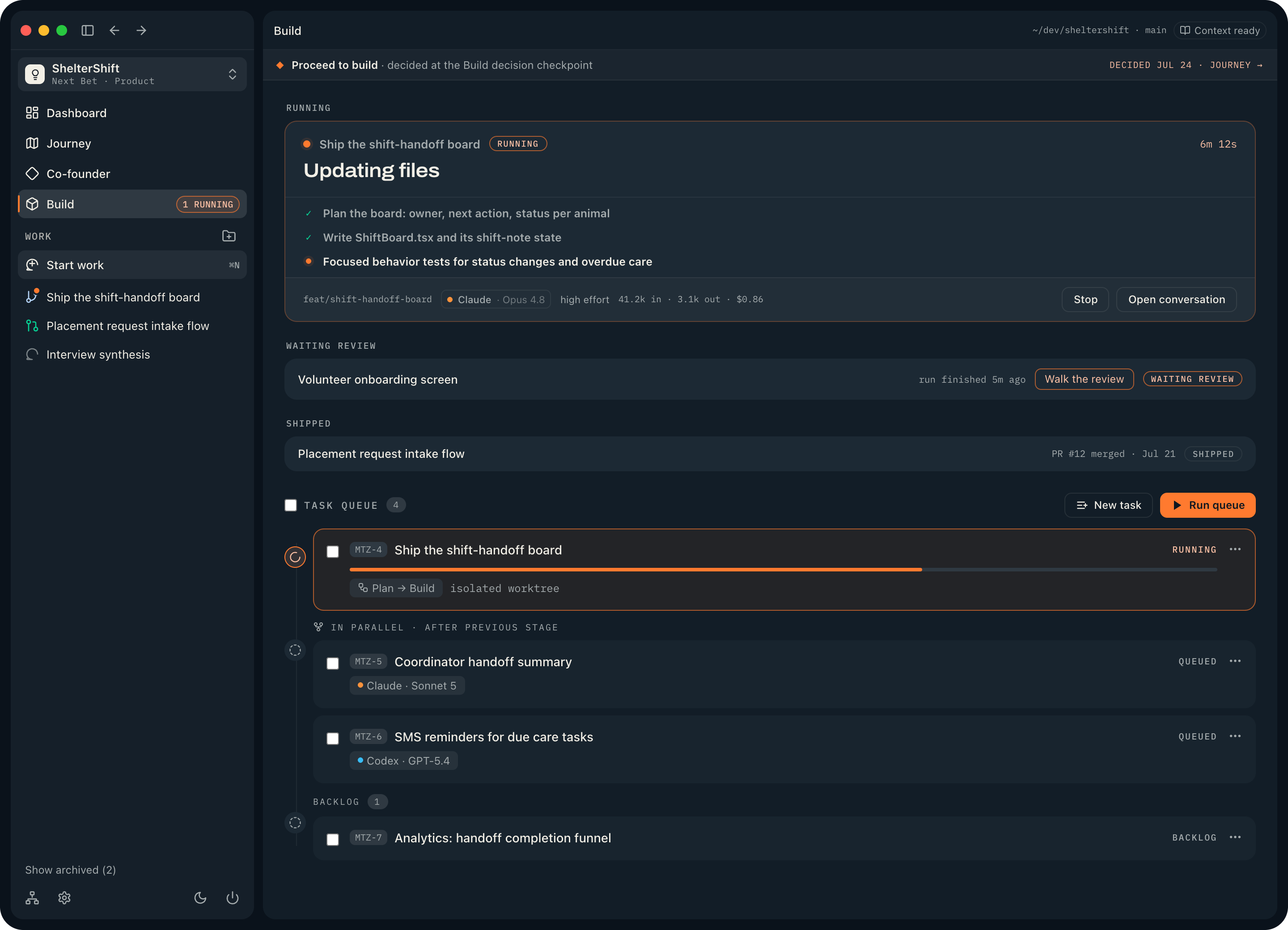
If any task fails or is stopped, the entire queue pauses; later stages stay queued, untouched, until you decide what to do. The same rule covers crashes: if the app stops while tasks are running, they are failed on the next launch with the error "The app stopped before this task finished. Review its thread before retrying." and their queues are paused. Nothing runs past a problem unattended.
Each executed task runs as a fresh build run titled after the task and linked back to it. Tasks require a repository — queueing without one fails with "Project tasks require a repository folder". Tasks can also arrive without you writing them: Product Design can turn a finished build prompt into one, and the build handoff seeds a set (below).
Sequential and parallel stages
Queued work renders as stages on a timeline; one stage runs at a time per product. A sequential, single-task stage runs directly in the project checkout. A parallel stage gives every task its own isolated Git worktree on a feat/mtz-{n}-{slug} branch, seeded with a snapshot of your uncommitted changes so each task starts from exactly what you see — Git, worktrees, and GitHub covers the mechanics.
Integrating parallel branches is always yours; Motriz never merges them for you. When a parallel stage completes with more work still queued, the queue pauses itself and shows "Parallel work is ready to integrate": open each completed task thread, integrate its branch into the project checkout, then resume the queue. Resuming is your confirmation that the branches are in. If nothing else is queued, the queue simply goes idle — integration still happens on your schedule.
Work items and their states
Build lists each piece of work — a work item — with one state chip, from a grammar of seven states:
| Chip | Meaning |
|---|---|
| Queued | Waiting in the task queue (queued work lives there, not as a row). |
| Running | A live run, shown as a card with the current activity and a Stop button. See work and runs. |
| Waiting review | The run finished; the row offers Walk the review. |
| Failed | The run failed; a failure record preserves the work. |
| Stopped | You stopped the run. The internal state is "cancelled", but the chip uses the word the run controls use. |
| Reviewed | You pressed Mark reviewed; merging is still yours. |
| Shipped | A merged GitHub PR exists on the item's branch. |
Rows group into "Running", "Waiting review", "Failed · stopped" (every row there reads "the finished work is kept"), and "Shipped". Two rules keep the chips honest: Shipped derives only from a merged PR Motriz can actually see, and a run that finishes after you marked the work reviewed reopens the review — the stamp only counts for the run it judged.
The walked review path
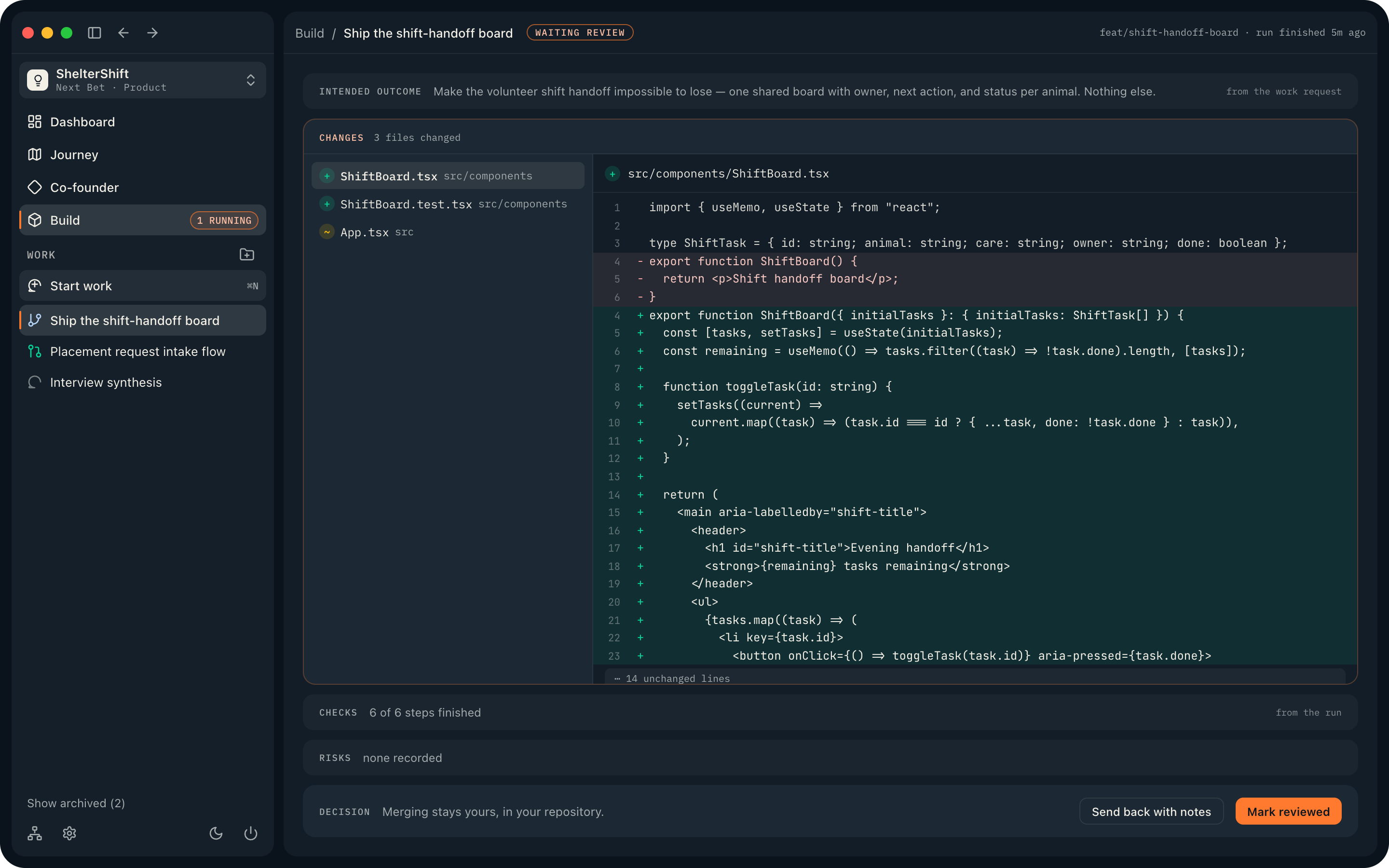
Opening a work item that is waiting for review shows a walked path, not a dashboard. Collapsed stations render as one-line rows — the rows are the path — and clicking any row makes it the current station. In fixed order:
- Intended outcome.
What the work was asked to do. Today this is the task's build prompt, labeled "from the work request"; with no task on file it falls back to the work item's name, stated as exactly that. Motriz does not invent a goal after the fact.
- Changes.
The walk deliberately starts here — you read the outcome on the way in. A full split diff viewer: changed files on the left, a read-only diff on the right, grouped by run.
- Checks.
Labeled "from the run": the run's own record — flow steps with results and durations, or a single-agent run's last tool calls. An empty station says "The run recorded no checks of its own — its full activity is in the conversation." Never an invented test readout.
- Risks.
Currently always "None recorded for this run." There is no automatic risk analysis in 1.0, and Motriz does not pretend otherwise.
- Decision.
Yours. "Merging stays yours, in your repository." Send back with notes opens the conversation prefilled with "Sending this back before it merges: "; Mark reviewed records your judgment (reversible with Reopen review). On code products this station is Done instead — see below.
Reviewed versus Shipped
Reviewing and merging are two different acts. Mark reviewed records that you walked the work; the row then reads "reviewed · merge when ready". Shipped is not something you set at all: it derives solely from a merged GitHub PR on the work item's branch, shown as "PR #{n} merged".
Nothing on the review path merges code. Merging happens in your repository or on the pull request — the Git and GitHub dialog can open and merge PRs when you ask it to. Motriz never claims a ship it cannot see: without a merged PR on the branch, nothing ever shows Shipped.
On a journey product, a shipped item opens a ship record instead: what was expected beside what is known now, composed only from real signal readings, plus a prompt to talk through how it landed with your co-founder. Shipping is treated as an observation point, never a success claim.
Code products end at "Done"
A plain code product walks the same review path, but the final station is Done instead of Decision — there is no journey to feed, so there is no decision station, and shipped work finishes quietly with no ship observation. The diff, the checks, and the merge discipline are identical. The coding harness is a complete product on its own; product guidance stays strictly opt-in.
When a run fails or you stop it
Failed and stopped work share one record shape, and it preserves the work. The headline is plain — "You stopped this run — everything it finished is kept.", "The run failed at step {i} of {n} — everything before it is intact.", or simply "The run failed — everything it finished is kept."
"What survived" lists the file changes kept on the branch, the steps that finished, and the plan and full transcript in the conversation. "The way back in" ranks your options: take it over in the conversation (the error and plan are already in context there — the primary recovery action; there is no per-step retry in 1.0), reset the task to the backlog for another run, or discard the branch while keeping the transcript. See Troubleshooting for recovery patterns.
The build handoff
Journey products reach an active build through a handoff — a full surface, not a dialog. Once the Build decision checkpoint records a build verdict, Journey shows "Ready for build handoff" with the button Proceed to build. The handoff surface ("Time to build.") asks where it gets built — create a new repository, use an existing one, or, on a later round, keep the current one — and shows exactly what travels: digest documents proportional to the build type, always including a learning plan and an evidence pack.
Three facts worth knowing before you press Start build & queue tasks:
- The pack lands in the repository as digests under
docs/venture/, committed asdocs: import venture handoff pack— only those paths. Raw documents never enter the repo; your co-founder keeps the full memory. - Tasks are seeded riskiest-first: work that tests a still-live assumption comes first and carries a "tests Risk {n}" chip. Every seeded task gets the built-in Plan → Build flow, queued sequentially.
- The queue stays idle until you press Run. The handoff prepares work; it never starts it.
Every handoff step is idempotent, so a failure can be fixed and retried; the product only flips to the building stage at the very end. After success, Motriz opens the product's Dashboard.